Setting up physical infrastructure to meet the rising demand for computing solutions is time-consuming, costly, and not as scalable as using cloud options. As a result, many turn to virtual private servers (VPSes). Unlike shared hosting, where multiple websites operate on a single server, a VPS offers an isolated environment, helping to reduce the risk of resource contention and mitigating potential vulnerabilities.
The market for virtual private servers was valued at $5.1 billion in 2024, and by 2033, it is expected to reach $14.1 billion, growing at an estimated CAGR of 11.9%. Choosing the right VPS provider can significantly impact an organization’s online operations, scalability, and cloud ROI—each contributing to overall success. Let’s explore the differences between DigitalOcean vs AWS Lightsail to help you make an informed decision that aligns with your cloud requirements and long-term growth goals.
Key takeaways:
-
A VPS provides dedicated virtualized resources for optimal performance, security, and control, giving users greater control over the operating system, software stack, and security configurations.
-
DigitalOcean offers simplicity, transparent pricing, strong performance, and cost-effective premium support tailored for developers at digital native enterprises and AI-native businesses.
-
Because AWS Lightsail operates as part of the AWS ecosystem, using it can involve vendor lock-in, pricing complexity, and customer support constraints.
What is a virtual private server (VPS)?
A VPS is a virtualized server environment that provides businesses with dedicated resources, ensuring optimal performance, security, and control over their digital assets. VPS solutions have emerged as a solid alternative to traditional dedicated servers for businesses seeking a balance between affordability and performance. With the power of virtualization, VPS providers offer scalable computing resources, flexible pricing models, and a wide range of customization options for various business needs.
What is DigitalOcean?
DigitalOcean prioritizes simplicity and caters to businesses seeking a streamlined VPS solution. DigitalOcean offers scalable VPS hosting through Droplets (virtual machines). It’s designed for teams that want cloud compute without the operational complexity associated with large hyperscaler platforms. DigitalOcean’s comprehensive VPS offering includes built-in tools for automation, monitoring, security, and infrastructure management that help organizations focus more on building and less on the minutiae of operating cloud infrastructure.
DigitalOcean VPS key features:
-
Linux-based virtual machines that offer full control over your server environment, from OS configuration to application setup. DigitalOcean supports popular Linux distributions, custom images, and one-click applications like Docker, LAMP/LEMP stacks, and databases.
-
Choose between shared CPU and dedicated CPU Droplets depending on whether your workload prioritizes cost efficiency or consistent performance.
-
Droplet options optimized for general-purpose workloads, CPU-intensive tasks, memory-heavy applications, or storage-focused use cases.
-
Built-in scalability with flexible sizing to scale CPU, memory, and storage as the application grows without the need to migrate servers.
DigitalOcean products
DigitalOcean offers a suite of cloud products to help developers build, deploy, and scale applications with ease. The platform consolidates compute, storage, networking, managed databases, and AI workflows into a simple, developer-friendly cloud hosting experience. DigitalOcean supports workloads ranging from small projects to production-scale applications via approachable interfaces and transparent pricing.
Virtual machines
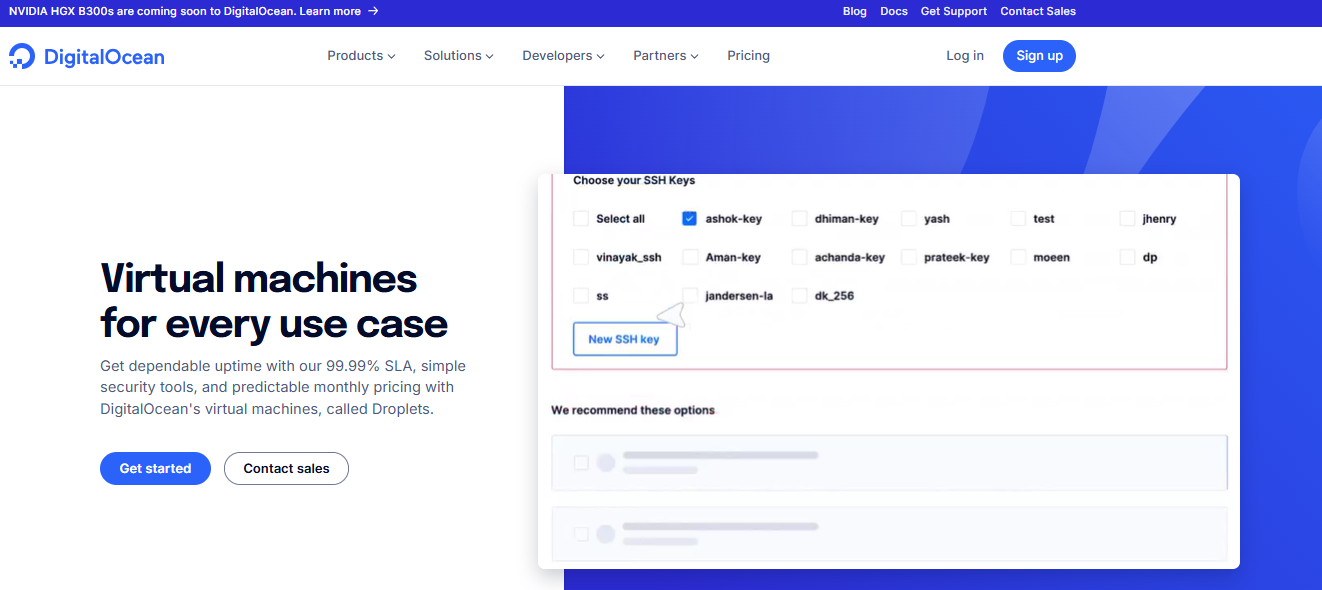
DigitalOcean Droplets are Linux-based virtual machines that support a wide range of workloads, from simple websites to production-scale applications. They provide developers with full control over their server environment with flexible scaling options to rightsize resources or deploy additional instances as demand changes. Droplets are available in multiple configurations optimized for general-purpose, CPU-intensive, memory-intensive, and GPU-based workloads.
| Droplet type | Best for | Description | Pricing |
|---|---|---|---|
| Shared CPU Droplets | |||
| Regular Shared CPU | Personal websites, test environments | Share processing power with other users on the same virtual server | Starts at $4/month, which includes 512 MiB memory, 1 vCPU |
| Premium Shared CPU | Applications requiring faster performance | Shared CPU with the latest 2 CPU generations available, NVMe SSDs, and enhanced memory to improve the performance of in-memory databases and server-side caches | Starts at $7, which includes 1GB memory, 1vCPU, 25GB NVMe SSDs, 1000GB transfer |
| Dedicated CPU Droplets | |||
| General Purpose | Wide variety of production workloads that require dedicated computer power | Balanced memory to CPU ratio | Starts at $63, which includes 8GB memory, 2 to 40 vCPUs, 25GB SSD, and 4TB transfer |
| CPU-Optimized | CI/CD, video encoding, machine learning, batch processing, and front-end web servers | Sustained CPU performance that isn’t memory-intensive 2:1 ratio of memory to CPU | Starts at $42, which includes 4GB memory, 2 vCPUs, 25GB SSD, and 4TB transfer |
| Memory-Optimized | Applications requiring more memory, High-performance databases, big data, and resource-intensive business applications | Additional memory improves performance for applications using large amounts of memory | Starts at $84, which includes 16GB memory, 2 vCPUs, 50GB SSD, and 4TB transfer |
| Storage-Optimized | Workloads capturing large amounts of data, high-performance NoSQL databases, analytics software, and data storage solutions | NVMe for faster disk performance | Starts at $131, which includes 16GB memory, 300GB SSD, and 4TB transfer |
Pricing and product information noted above and throughout this document is correct as of December 2025, and subject to change.
One of DigitalOcean’s key strengths is the easy-to-use control panel for users to spin up and manage Droplets (virtual machines), load balancers, databases, and storage with just a few clicks. This intuitive approach, along with a user-friendly interface and simple pricing model, has won the hearts of many developers, digital native enterprises, and AI-native businesses, who value efficiency and ease of use.
Kubernetes
DigitalOcean Kubernetes (DOKS) is a fully managed, CNCF-certified Kubernetes service that simplifies running containerized workloads at scale. It comes with a managed high-availability control plane and support for GPU workloads. Clusters can scale automatically, integrating with DigitalOcean storage and networking. It includes features like automatic updates and built-in bandwidth to reduce operational overhead.
Load Balancers
DigitalOcean Load Balancers distribute incoming traffic across multiple Droplets or Kubernetes workloads. They are straightforward to provision and manage through the DigitalOcean control panel or API. Built-in features include health checks and automatic failover to help maintain reliability during traffic spikes. Load Balancers support free SSL certificates through Let’s Encrypt and protocols such as HTTP/3. DigitalOcean offers multiple load balancer types, like regional, global, and network load balancers. This helps teams choose the right model to meet their complex networking requirements. Load Balancers can be scaled from a single node up to 100 nodes as application demand grows—adding nodes helps handle higher traffic volumes and increased request rates while maintaining performance and availability. Pricing starts at $12/month/node, with each additional node increasing capacity for requests per second.
Managed Databases
DigitalOcean Managed Databases provides a fully managed database service that removes the operational overhead. You get instant access to a variety of data stores—from relational databases like PostgreSQL to event-streaming platforms like Kafka. Built-in capabilities like automated backups, monitoring, and automatic failover are available. Database clusters can be scaled by adding CPU, memory, and storage, with options to run on shared or fully dedicated vCPUs depending on workload criticality. Pricing follows a predictable, flat-rate model with monthly caps, starting at $15/month, and scales based on cluster size and resource configuration.
Storage
DigitalOcean storage offers cloud storage options to support everything from static assets to data-intensive AI/ML workloads. The portfolio includes Spaces object storage for storing and serving unstructured data at scale with S3 compatibility, Volumes block storage for attaching persistent storage to Droplets, Spaces CDN for accelerating global content delivery, and Network File Storage (NFS) for high-performance, shared file systems used in data-heavy and machine learning workloads. Storage services are priced separately based on usage and capacity so that you can choose the right storage type and scale independent of compute resources. This tiered approach makes it possible to start small and expand storage performance and capacity as application demands grow.
Storage pricing:
Spaces start at $5/month, Volumes start at $10/month, and NFS starts at $0.30/GiB/month.
-
Looking for an Amazon S3 alternative with approachable pricing? If predictable costs and simple setup matter, DigitalOcean Spaces offers a competitive S3-compatible option.
-
Learn how smart data classification, automated tiering, and predictable pricing models help teams reduce waste while keeping critical workloads fast, secure, and scalable. Discover practical storage management strategies you can apply using DigitalOcean Spaces, Volumes, and Managed Database storage.
DigitalOcean’s unified agentic cloud ecosystem
DigitalOcean combines cloud infrastructure and AI tooling into an integrated platform to support the full lifecycle of AI applications. Gradient™ AI brings together the tools needed to build, test, and operate AI agents. You can use DigitalOcean Gradient™ AI Droplets for on-demand cloud GPU resources, scale to Bare Metal GPUs for intensive multi-node workloads, and get started with one-click access to popular pre-trained models. Store and access large training datasets via Spaces object storage, simplifying the process of connecting data, compute, and AI workflows in one place.
DigitalOcean performance
DigitalOcean has garnered customer praise for strong performance across diverse workloads. DigitalOcean holds an “Excellent” rating on Trustpilot with a 4.6 out of 5 TrustScore, based on over 2,100 reviews. Customers praise ease of use, responsive support, and clear guidance when resolving complex technical issues. The company’s focus on providing optimized and streamlined infrastructure has impressive results, particularly for applications that demand high CPU and memory resources.
DigitalOcean’s storage offers significantly faster read and write speeds than traditional hard disk drives (HDDs). This performance boost can be particularly beneficial for applications that rely heavily on disk I/O operations, such as databases or content management systems.
In addition to SSD storage, DigitalOcean offers a range of CPU-optimized Droplets for compute-intensive workloads, ensuring businesses can access their ideal processing power to handle demanding tasks.
DigitalOcean scalability
DigitalOcean provides vertical scaling capabilities to resize Droplets as needed by increasing or decreasing CPU, RAM, and storage resources. This resizing process involves minimal downtime, ensuring that applications remain available during scaling.
Additionally, DigitalOcean offers auto-scaling and horizontal scaling through load balancers and cloud firewalls, enabling businesses to distribute traffic across multiple Droplets while improving application security and performance.
DigitalOcean customer support
DigitalOcean support stands out in the cloud computing market because it offers accessible and cost-effective options tailored to the needs of developers at digital native enterprises and AI-native businesses.
DigitalOcean provides free support to all customers, along with paid support tiers that provide expanded coverage, faster response times, and additional assistance tailored to workload needs.
| Support plan | Price per month | Response time | Average resolution time | Level of support |
|---|---|---|---|---|
| Starter | Free | <24 hours | 48 hours | Customer support staff providing general guidance. |
| Developer | $24 | <8 hours | 16 hours | Customer support staff providing general guidance with quicker response and resolution time. |
| Standard | $99 | <2 hours | 4 hours | Adds live chat. Engagement with DigitalOcean’s technical support team for faster troubleshooting and deeper assistance. |
| Premium | $999 | <30 minutes | 2 hours | Direct Slack channel, and priority access to experienced DigitalOcean support engineers for faster response times within 30 minutes. |
Experience support that feels premium! Don’t let complex pricing hinder your access to top-notch cloud support. With DigitalOcean’s premium support, you get personalized, responsive assistance tailored to your business needs.
DigitalOcean documentation
DigitalOcean’s documentation provides clear, product-focused guidance to help developers build, deploy, and scale applications. It combines technical walkthroughs and reference material with practical examples and platform-level context. Complementing the official docs is a large community-driven library with 8,000+ tutorials of step-by-step guides and real-world examples. These articles span cloud infrastructure, DevOps, and AI/ML use cases. Together, these resources make it easier for teams to learn, troubleshoot, and adopt DigitalOcean services.
Browse through our practical guides for modern cloud and AI workloads:
What is AWS Lightsail?
AWS Lightsail, designed for both Windows and Linux operating systems, provides integration with other AWS services, such as Amazon Elastic Compute Cloud (EC2), Amazon Relational Database Service (RDS), and Amazon Simple Storage Service (S3). AWS Lightsail for research provides access to pre-configured VPS instances tailored for research workloads.
AWS Lightsail key features:
-
Virtual private server instances that can be launched using base operating systems like Windows and Linux/Unix, preconfigured applications, or development stacks such as LAMP, Nginx, and WordPress.
-
Built-in networking capabilities with static IP addresses, DNS management, firewall rules, and load balancers for controlling traffic and improving availability.
-
Support for both SSD-backed block storage and object storage buckets, along with content delivery network (CDN) distributions for serving static assets globally.
-
Connects Lightsail resources to other AWS services through VPC peering for projects to expand into the broader AWS ecosystem as requirements evolve.
Looking for an AWS alternative? DigitalOcean helps reduce the operational complexity of cloud infrastructure with managed, developer-friendly products that abstract much of the underlying setup.
AWS Lightsail products
AWS Lightsail’s deep integration with the complex AWS ecosystem facilitates incorporation with a wide range of AWS services, including load balancers, object storage, and databases.
Virtual machines
AWS Lightsail offers a range of instance sizes and pricing options, including monthly and hourly billing models that cater to diverse business requirements. All Lightsail instances use fixed bundles that include compute, SSD storage, and a predefined data transfer allowance. With DigitalOcean, this storage can be added to or resized independently of the instance as storage needs change.
| Instance type | Best for | Description | Pricing |
|---|---|---|---|
| Linux/Unix – IPv4 bundles | Websites, APIs, development environments, and small production workloads | Virtual servers with a public IPv4 address, SSD-backed storage, and bundled data transfer. Available across multiple memory and vCPU configurations, scaling from small instances to high-memory, high-vCPU servers. | Starts at $5/month |
| Linux/Unix – IPv6-only bundles | Cost-sensitive workloads, IPv6-native applications, internal services | Similar to IPv4 bundles but provisioned with IPv6-only networking. Designed for networking environments where IPv6 is preferred or required. | Starts at $3.50/month |
| Windows – IPv4 bundles | Windows applications, .NET workloads, remote desktop environments | Windows-based virtual servers with a public IPv4 address, SSD storage, and bundled data transfer. Includes Windows licensing in the monthly price. | Starts at $9.50/month |
| Windows – IPv6-only bundles | Windows workloads in IPv6-focused networks | Windows virtual servers using IPv6-only networking, with bundled storage and data transfer. Intended for environments standardizing on IPv6. | Starts at $8/month |
| High-memory Linux/Unix bundles | Memory-intensive workloads, large databases, analytics jobs | Large instance sizes with significantly higher memory, vCPU counts, and SSD storage, available with IPv4 or IPv6-only networking, depending on configuration. | Starts at $880/month |
| High-memory Windows bundles | Enterprise Windows workloads, large-scale applications | High-capacity Windows instances with large memory and CPU allocations, SSD-backed storage, and bundled transfer. | Starts at $1,250/month |
Overwhelmed by EC2’s complexity and unpredictable costs? Amazon EC2 offers flexibility, but its pricing models and operational overhead can slow teams down. If you want predictable costs and simpler cloud compute without sacrificing performance, it’s worth exploring 8 Amazon EC2 Alternatives.
Containers
AWS Lightsail container services are a managed offering to deploy and run containerized applications that don’t require users to configure or operate underlying orchestration infrastructure. A container service consists of one or more compute nodes that run container workloads behind a built-in load-balanced public endpoint. Each container service includes a monthly data transfer quota, with additional outbound transfer billed separately if usage exceeds the included allowance. Pricing starts at $7/month (Shared vCPU: 0.25, RAM: 512MB).
💡AWS egress pricing can become difficult to predict as workloads scale. The pricing model varies by service, region, and transfer type, which can lead to unexpectedly high bills. In contrast, providers like DigitalOcean offer flat, transparent bandwidth pricing, reduce cost uncertainty, and make it easier for teams to plan growth without worrying about data transfer fees.
Load balancers
AWS Lightsail load balancers operate at the application layer, automatically routing traffic across instances in multiple Availability Zones. They perform health checks to ensure requests are only sent to healthy resources. Load balancers can be created from the Lightsail console, the AWS Command Line Interface (AWS CLI), or the Lightsail API. Lightsail load balancers support HTTPS with SSL/TLS certificates, HTTP-to-HTTPS redirection, session persistence, and configurable TLS security policies. Load balancer starts at $18/month.
Managed databases
AWS Lightsail managed databases provide a simplified way to create and run fully managed MySQL and PostgreSQL databases within Lightsail. The service handles tasks such as backups, maintenance, security updates, and point-in-time recovery. Lightsail databases can be used alongside Lightsail instances or as standalone databases, and scale by restoring snapshots to larger database configurations as capacity or performance requirements increase. Managed database plans start at $15/month for the Standard plan, with additional tiers available for increased capacity and high availability.
Storage
AWS Lightsail storage includes both block storage and object storage options to support common application and website workloads within the Lightsail environment. Lightsail block storage uses SSD-backed disks that can be attached to Linux or Windows instances to provide persistent, low-latency storage. This storage can be added to or resized independently of the instance as storage needs change. Lightsail object storage buckets enable users to store and retrieve unstructured data over the internet, commonly used for static assets, backups, and media files, with features such as versioning, access controls, and regional placement. Object storage buckets are created using predefined storage plans (referred to as bundles) that define storage capacity and data transfer quotas. Storage pricing starts at $1/month for object storage bundles and $0.80/month for SSD-backed block storage, based on capacity and usage.
Content delivery network (CDN)
AWS Lightsail CDN is provided through Lightsail distributions, which use the same underlying infrastructure as Amazon CloudFront to deliver content closer to end users. A Lightsail distribution routes requests to geographically closer edge locations. CDN distributions are billed at a fixed monthly rate, starting with a first-year free tier, followed by plans that include 50 GB transfer for $10/month, 200 GB transfer for $35/month, and 500 GB transfer on higher monthly tiers.
Broader AWS ecosystem
AWS provides products with compute, storage, networking, databases, analytics, security, and application services for workloads to scale from simple projects to large, distributed systems. The AI/ML workflow comprises managed services, infrastructure, and tools that support the full machine learning lifecycle. Services such as Amazon SageMaker support the deployment of machine learning with frameworks like PyTorch and TensorFlow.
AWS Lightsail performance
As part of the broader AWS ecosystem, AWS Lightsail instances are built on the same underlying hardware as other AWS services, ensuring stable performance across various applications during service uptime. AWS Lightsail integrates with other AWS services, such as Amazon Elastic Load Balancing (ELB) and Amazon Elastic File System (EFS).
AWS Lightsail scalability
AWS Lightsail offers vertical scaling by adjusting the instance type or adding more instances behind a load balancer. AWS Lightsail also integrates with other AWS services, such as auto-scaling and Elastic Load Balancing, allowing businesses to automatically scale their infrastructure based on demand and ensure optimal resource utilization.
AWS support
AWS offers a range of support plans, from the free basic plan to the enterprise support plan, each with varying access levels, response times, and costs. However, the higher-tier plans, which provide dedicated technical account managers (TAMs) and expedited response times, come at a significant financial investment.
The AWS support tiers and their pricing are as follows:
-
Business Support+: Starts at $29/month per account or a percentage of monthly AWS usage (whichever is higher), with usage-based pricing tiers that decrease as spend increases.
-
Enterprise Support: Requires a minimum spend of $5,000/month or 10% of monthly AWS usage (whichever is higher), with tiered percentage pricing at higher spend levels.
Unified Operations: Starts at a $50,000/month minimum or a percentage of monthly AWS usage (whichever is higher), scaling down at higher usage tiers.
AWS Lightsail documentation
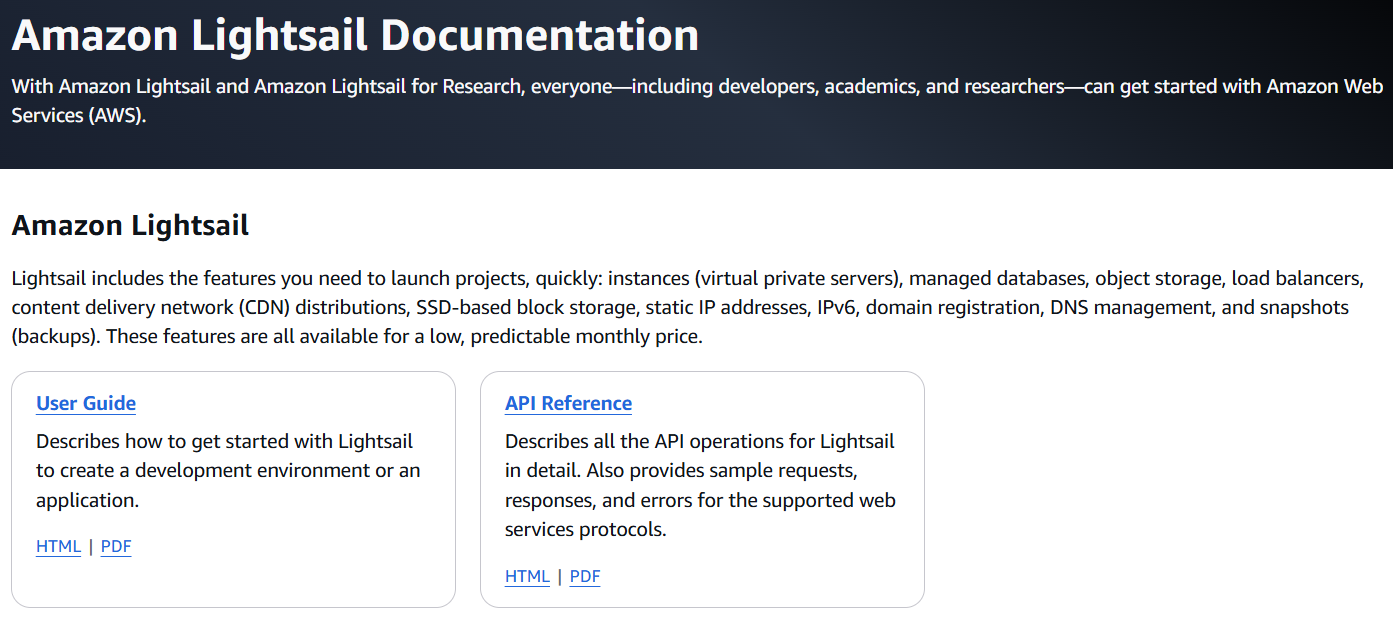
AWS Lightsail documentation offers structured guidance for understanding and using the Lightsail platform, covering core concepts and practical implementation details. It includes a user guide that explains how to set up and manage resources such as virtual servers, storage, databases, networking, and containers, along with API references for programmatic access and automation. The documentation also extends to Lightsail for Research with materials for academic and research use cases, resource controls, and usage tracking.
In practice, AWS documentation might sometimes lag behind rapid product and UI changes, which may lead to outdated references and make it harder for users to find clear, up-to-date guidance.
Learn what makes AWS complicated and how teams can reduce friction and simplify their cloud setups.
When to use DigitalOcean vs AWS Lightsail
Choosing the right VPS provider between DigitalOcean vs AWS Lightsail provides a strong foundation for your business’s online operations and facilitates smooth integration with essential services, enabling efficient cloud application performance management and improved security. When comparing DigitalOcean and AWS Lightsail, several key factors like pricing, performance, scalability, vendor lock-in, and integration with other services come into play.
Egress costs
DigitalOcean charges for outbound data transfer (egress) with Droplets, and this allowance can be shared across all Droplets in an account once individual limits are exceeded. The total data transfer out from the data centers, with pricing as follows:
-
Outbound data transfer is included with Droplets, starting at 500 GiB per month, depending on Droplet size.
-
Additional egress is charged at $0.01 per GiB.
DigitalOcean’s pricing structure remains consistent across all data center regions, eliminating the need for complex calculations based on geographic location and ensuring a more predictable and manageable cost structure. The potential for these inter-regional data transfer costs to escalate significantly highlights the importance of carefully evaluating data residency requirements, workload distribution, and overall data transfer patterns compared to AWS Lightsail, other AWS services, and hyperscaler clouds in general. Businesses with global operations or stringent data sovereignty requirements may find DigitalOcean’s consistent and transparent pricing model more appealing, as it eliminates the risk of unexpected costs associated with moving data across regions and makes it an attractive option for cloud cost optimization.
AWS Lightsail’s egress costs align with the broader AWS data transfer pricing model, which can vary based on the region and the data transfer destination:
-
100GB free each month, aggregated across all AWS services and regions (except China and GovCloud)
-
First 10TB per month: $0.09 per GB
-
Next 40TB per month: $0.085 per GB
-
Next 100TB per month: $0.07 per GB
-
Greater than 150 TB per month: $0.05 per GB
While data transfer between AWS services within the same region is free, transferring data between two instances or services across different AWS regions incurs additional charges. This means that the straightforward task of moving data between two EC2 instances or services in different AWS regions may result in substantial expenses, particularly for businesses with high data transfer volumes or globally distributed workloads. DigitalOcean Droplets include 500 GiB of outbound data transfer per month, while AWS offers only 100 GiB free per month shared across services and regions, after which higher egress charges apply, which make costs harder to predict.
Cost-effective and transparent pricing
When comparing DigitalOcean vs AWS pricing, DigitalOcean is a better fit for teams that prioritize cost predictability, simplicity, and clear pricing as they scale. Its pricing model is straightforward and consistent across regions: resources are billed at a flat monthly rate based on the Droplet size you choose, with clearly defined CPU, memory, storage, and data transfer limits. This transparency helps reduce the risk of unexpected charges and makes DigitalOcean appealing to developers, digital-native enterprises, and AI startups seeking tight control over infrastructure spend.
AWS Lightsail, while positioned as a simplified entry point into the AWS ecosystem, can become more complex from a cost perspective as requirements grow. Pricing is harder to estimate when integrating Lightsail with other AWS services or enabling more advanced features, as costs vary based on regions, availability zones, data transfer, and additional service usage. The layered pricing structure might introduce ambiguity, making it challenging for teams to forecast expenses accurately and increasing the likelihood of unexpected charges or “bill shock” over time.
While AWS Lightsail’s entry-level instance starts at $3.50 per month compared to DigitalOcean’s $4 starting point, overall costs can change once scaling components are introduced. DigitalOcean load balancers start at $12 per month, compared to $18 per month for AWS Lightsail, which might lead to meaningful cost differences as application needs grow. AWS Lightsail uses fixed bundles that combine compute, storage, and data transfer. But DigitalOcean follows a modular approach, where resources can be scaled independently.
Note: All pricing and product information cited is correct as of December 2025, and subject to change
💡NoBid operates in the world of real-time advertising and manages a staggering 200 billion incoming requests. Migrating to DigitalOcean slashed their total cloud costs by 30% compared to AWS while maintaining high-speed latency.
Performance
Based on the performance consistency scores from VPSBenchmarks, DigitalOcean has an edge over AWS Lightsail in terms of consistent performance across servers and plans. DigitalOcean’s consistency score of 69 indicates that the performance of their servers is relatively consistent across different trials and server configurations. A higher consistency score suggests that customers can expect similar performance levels when provisioning servers of the same type, minimizing the risk of significant performance variations.
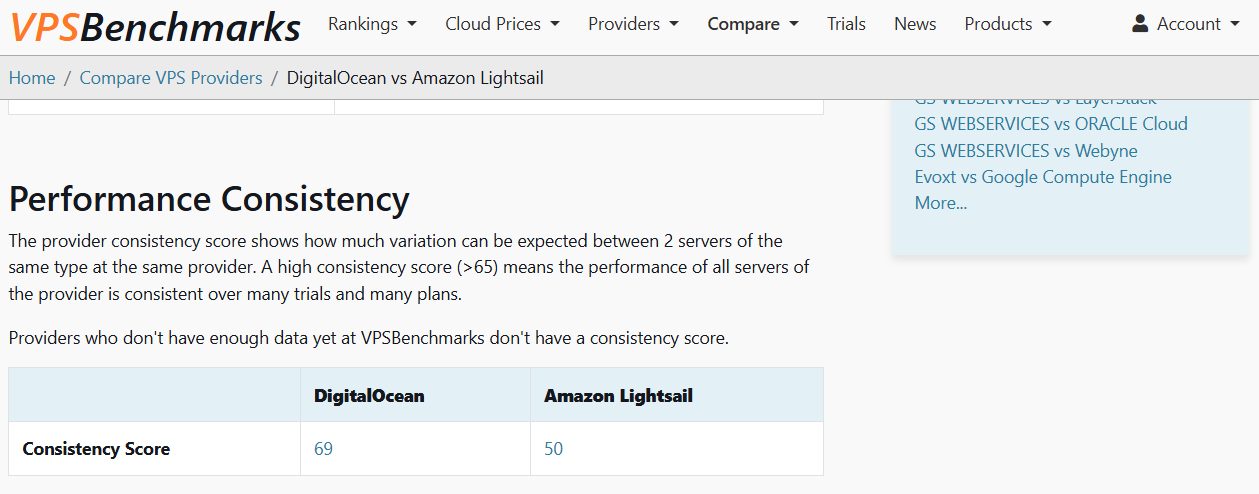
On the other hand, AWS Lightsail’s lower consistency score of 50 suggests that there may be more variability in their servers’ performance, even when provisioning servers of the same type. This may potentially lead to inconsistent customer performance experiences, depending on which specific server instances they are assigned.
Developer experience and ease of use
DigitalOcean is well-suited for organizations that want to move quickly with minimal setup and management. Its control panel, APIs, and documentation are designed around common developer workflows, which makes it easy to provision infrastructure, deploy applications, and manage resources without deep platform-specific knowledge. Features such as predictable resource configurations, clear abstractions, and step-by-step tutorials help reduce friction for both new and experienced users. Teams can focus more on building and shipping applications rather than managing cloud complexity.
AWS Lightsail aims to simplify access to AWS, but the broader AWS ecosystem introduces challenges for usability and onboarding. As projects grow or require integration with additional AWS services, users may encounter the AWS complexity trap—where hundreds of services, overlapping concepts, and service-specific configurations become difficult to navigate. For newcomers, startups, or teams with limited cloud expertise, this steep learning curve might slow development and increase operational overhead, making it harder to identify which services are necessary and how they fit together.
💡Seeking to escape “infrastructure fatigue,” Plan to Eat moved from AWS to DigitalOcean to gain a simpler management UI and more predictable monthly billing.
Support plan affordability and response times
AWS Lightsail inherits the broader AWS support structure, where access to dedicated Technical Account Managers is available only through higher-tier support plans. AWS users on community forums have raised concerns about consistency in response times across paid tiers. AWS customer support offers multiple paid support tiers with defined response-time targets based on issue severity. Response times and access to technical support vary depending on the selected plan. This can be challenging for businesses with mission-critical workloads.
In contrast, DigitalOcean’s support offering presents several advantages, such as guaranteed response times and cost-effective support plans. The availability of communicating with reps via a direct Slack channel increases convenience and often enables faster response times than even DigitalOcean’s stated commitments require. By offering accessible, cost-effective, and dedicated support tailored to the unique requirements of developers at digital-native enterprises, DigitalOcean is an ideal option.
Vendor lock-in
DigitalOcean is typically preferred by teams that value portability and flexibility in their infrastructure decisions. Its services are built around widely adopted technologies, standard Linux environments, and simple networking models, simplifying the process of moving workloads between cloud providers or back to on-premises environments if requirements change. This helps organizations maintain long-term flexibility and reduce friction when evolving their infrastructure strategy.
As teams integrate Lightsail with additional AWS services, they may encounter vendor lock-in, where migrating workloads elsewhere becomes more complex. For businesses that prioritize cloud portability and want to avoid long-term dependency on a single vendor, these factors can be an important consideration when evaluating Lightsail.
DigitalOcean vs AWS Lightsail FAQs
What is the difference between DigitalOcean Droplets and AWS Lightsail?
DigitalOcean Droplets are general-purpose Linux virtual machines with consistent configurations and predictable pricing across regions. AWS Lightsail provides bundled virtual servers that are integrated into the broader AWS ecosystem, where costs can become harder to forecast as additional services or data transfer are introduced. The primary difference lies in infrastructure flexibility and portability versus ecosystem integration.
Which cloud platform is easier for beginners?
DigitalOcean’s cloud platform is beginner-friendly thanks to its clean interface, simpler service catalog, and extensive step-by-step documentation. Lightsail simplifies AWS but still exposes users to AWS concepts and terminology as projects grow. This can increase the learning curve over time.
Is DigitalOcean cheaper than Lightsail?
DigitalOcean’s pricing model is transparent and generally easier to predict, especially across regions. Lightsail might appear cost-effective initially, but costs can become harder to estimate when integrating with other AWS services. Predictability is often the deciding factor rather than the base price alone.
Which option provides better performance?
DigitalOcean generally provides more predictable performance because it offers clearly defined compute configurations, including dedicated CPU options for sustained workloads. This reduces variability and helps ensure consistent results under CPU-intensive or long-running applications. AWS Lightsail relies on bundled instance types, which might introduce performance variability depending on the underlying infrastructure.
Which is better for running Docker or microservices?
DigitalOcean is well-suited for Docker and microservices through Kubernetes (DOKS), App Platform, and standard Droplet-based deployments. Lightsail supports containers, but more complex microservice architectures often require moving into services like ECS or EKS. Teams focused on simplicity tend to prefer DigitalOcean for containerized workloads.
Experience the power of simplicity and performance with DigitalOcean
For businesses seeking a straightforward, developer-friendly, and cost-effective VPS solution, DigitalOcean is a strong contender. DigitalOcean’s comprehensive documentation and strong community make it accessible even for those with limited cloud computing experience.
 DigitalOcean offers VPS solutions and so much more:
-
Droplets: Scalable Linux virtual machines tailored to your needs, with options ranging from basic to optimized plans for compute, memory, and storage requirements.
-
Spaces: Secure and cost-effective object storage solution, ideal for storing and serving static assets, backups, and data archives with high durability and availability.
-
Block storage: Attach additional storage volumes for great flexibility to scale storage independently from Droplets and easily migrate data between instances.
-
Load balancers: Distribute traffic across your resources, ensuring high availability, improved performance, and effortless scalability for applications.
-
Databases: Fully managed database solutions for effortless deployment, including PostgreSQL, MySQL, Redis, and Kafka, with automatic backups, failover, and vertical scaling.
-
DigitalOcean Kubernetes (DOKS): Containerized application hosting with Kubernetes clusters, simplifying deployment, scaling, and managing containerized workloads in a production-ready environment.
-
App Platform: Build, deploy, and scale applications effortlessly with a fully managed Platform-as-a-Service (PaaS) solution that supports popular frameworks and languages.
-
One-click Apps: Deploy popular apps and stacks like WordPress, Docker, and LAMP with a single click.
-
DigitalOcean Gradient™ AI Agentic Cloud: Train AI applications using GPU-powered compute, pre-trained models, and tools for agent workflows, RAG, and model evaluation, with integrated storage and scalable infrastructure.
Whether you’re a developer getting started, a digital-native enterprise scaling production workloads, or an AI-native business building applications, DigitalOcean is built for the way you work.
Sign up for a hassle-free VPS experience by exploring DigitalOcean’s offerings today!
About the author

Sujatha R is a Technical Writer at DigitalOcean. She has over 10+ years of experience creating clear and engaging technical documentation, specializing in cloud computing, artificial intelligence, and machine learning. ✍️ She combines her technical expertise with a passion for technology that helps developers and tech enthusiasts uncover the cloud’s complexity.
Start building today
From GPU-powered inference and Kubernetes to managed databases and storage, get everything you need to build, scale, and deploy intelligent applications.