
AI/ML Technical Content Strategist

For the past year, video generation has been one of the most promising applications for AI technology. With the proliferation of OpenAI’s Sora, Google’s VEO and Kling AI videos across social media, AI video generation is basically unavoidable in the modern online landscape. This has many long term implications, but the utility of this technology should not be underestimated or ignored.
Open-source technologies have lagged behind these proprietary models for some time now though. While they could generate high-quality video in varied styles with good prompt adherence, like with Wan2.2, they lacked the paired audio generation. While Wan’s Sound-to-Video models made a step in the right direction, there was just too much of a difficulty curve using these models to actually make use of them for something like content creation. This major limitation has held these open-source technologies back from reaching the wider, non-technical audience and for the enterprise world.
That is all poised to change with LTX-2. A true step forward for open-source video generation, LTX-2 is undoubtedly the most powerful video generation technology ever open sourced. Simply put, “LTX-2 is a DiT-based audio-video foundation model designed to generate synchronized video and audio within a single model.” This powerful pairing, combined with efficient model design that makes it possible to run on consumer grade GPUs, makes LTX-2 a formidable tool for creating video.
In this tutorial, we will walkthrough how LTX-2 works as we explore its architectural pipeline, and then show how to run LTX-2 on DigitalOcean Gradient using the ComfyUI.
Key Takeaways
- LTX-2 is a true step forward for video generation, unifying audio and video modeling in a single pipeline
- LTX-2 is easy to run on Gradient AI using NVIDIA GPUs
- LTX-2 is available to run for free right now on Hugging Face
LTX-2: How it works
LTX-2 is a unified video-audio generation model. At its core, it is comprised of an asymmetric dual-stream transformer that has individual video and audio streams that are paired with “bidirectional audio-video cross-attention layers with temporal positional embeddings and cross-modality AdaLN for shared timestep conditioning.” (Source). This unification allows for a more efficient generation of both streams, with a larger allocation of capacity for video generation than audio generation.
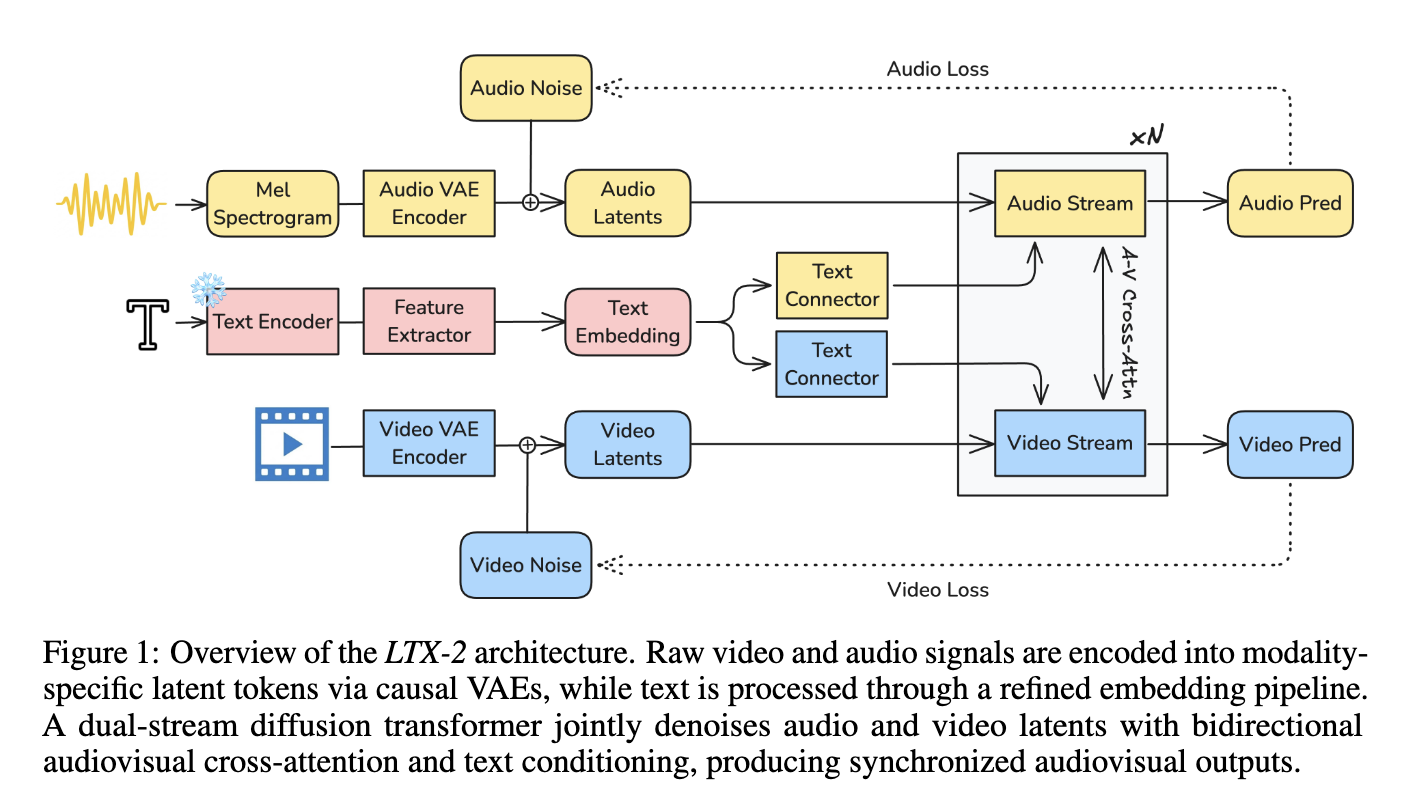
We can see the architecture of the model above. In practice, Raw video and audio signals are encoded into modality-specific latent tokens via causal VAEs, while text is processed through a refined embedding pipeline. A dual-stream diffusion transformer then jointly denoises the audio and video latents, leveraging bidirectional audiovisual cross-attention and text conditioning to generate synchronized audio-visual outputs.
To make this possible, the Lightricks team made several advancements in Computer Vision and Audio generation technology. Notably, LTX-2’s paper supplies four key contributions made for this release:
-Efficient Asymmetric Dual-Stream Architecture: the transformer-based backbone featuring modality-specific streams linked via bidirectional cross-attention and cross-modality AdaLN for shared timestep conditioning.
- Text Processing Blocks with Thinking Tokens: they also developed a novel text-conditioning module that uses multi-token prediction to enhance prompt understanding and semantic stability.
- Compact Neural Audio Representation: to process audio, they created an efficient causal audio Variational AutoEncoder (VAE) that produces a high-fidelity, 1D latent space optimized for diffusion-based training and inference.
- Modality-Aware Classifier-Free Guidance: A novel Bimodal configuration scheme that allows for independent control over cross-modal guidance scales, significantly improving audiovisual alignment
All together, these make for the most efficient open-source video model available, that combines video and audio generation into a single pipeline.
Demo: LTX-2 with ComfyUI on GPU Droplet
Now that we have looked at how the model works, we can begin with the demo. To get started, log into DigitalOcean Gradient, and create a GPU Droplet. We recommend an NVIDIA H100 or H200 GPU for running LTX-2, but it should run on the NVIDIA A6000 sufficiently as well. Once your Droplet has spun up, access it through SSH on your local computer’s terminal.
Setting up the GPU Droplet
Follow the instructions outlined in this tutorial to get your GPU Droplet set up if you have not done this before. You will then use SSH to access the GPU Droplet on your local machine using VS Code or Cursor. Keep both the terminal window and connected VS Code/Cursor window open for later.
Setting up the ComfyUI & Downloading the Models
Using the terminal window connected to the GPU Droplet, navigate to the directory of your choice. Once there, paste the following code in to install the ComfyUI on the GPU Droplet, download the required models for LTX-2, and then run ComfyUI and access it with VS Code/Cursor’s simple browser:
git clone https://github.com/Comfy-Org/ComfyUI
cd ComfyUI
python3 -m venv venv
source venv/bin/activate
pip install -r requirements.txt
cd models/text_encoders
wget https://huggingface.co/Comfy-Org/ltx-2/resolve/main/split_files/text_encoders/gemma_3_12B_it.safetensors
cd ../checkpoints
wget https://huggingface.co/Lightricks/LTX-2/resolve/main/ltx-2-19b-dev-fp8.safetensors
cd ../latent_upscale_models
wget https://huggingface.co/Lightricks/LTX-2/resolve/main/ltx-2-spatial-upscaler-x2-1.0.safetensors
cd ../loras
wget https://huggingface.co/Lightricks/LTX-2/resolve/main/ltx-2-19b-distilled-lora-384.safetensors
cd ../custom_nodes
git clone https://github.com/Lightricks/ComfyUI-LTXVideo
cd ComfyUI-LTXVideo/
pip install -r requirements.txt
cd ../..
python main.py
Once this completes, take the outputted URL (default is http://127.0.0.1:8188) and use the VS Code/Cursor Simple Browser feature to access it in your local machine’s browser.
Running LTX-2
To now run the LTX-2 workflow, we can navigate to the left hand side of the window to access the sidebar’s templates icon. Click it, and then search for and select the “LTX-2 Text to Video” template. This will complete our setup. If we now click run, we will get the default video of a puppet singing about rain. We cannot share video on this platform, but here is a gif of the video without sound.

From here, we can click the prompt window to modify the output video, and change the video size/length as well. We recommend playing around with all your ideas. The model excels at creating videos with sound, so be sure to include prompts with “quoted” speech, sound cues, and music.
For Image to Video generation, go back to the template selection menu and search for the “LTX-2 Image to Video” template. You can then input any image you have created or taken in real life, and animate them with a prompt. For example, we can tell a still image of a beach scene to turn into a full video animation with crashing waves, calling seagulls, and a windy beach. Here is an example of just that:

It’s clear from our experiments that, at least for this first release of LTX-2, the text-to-video capabilities far outstrip the image-to-video capabilities. This is a bit of a shame, but we expect this to be ameliorated in future iterations of the model, which Lightricks’ LTX-2 team has promised to come.
Closing Thoughts
LTX-2 is perhaps the most impressive model we have gotten to play with in the video sphere. Even more so than VEO-3 and Sora 2, we are blown away by the speed and accessibility of the open-source model. We encourage everyone to try this model out on Gradient today!
Thanks for learning with the DigitalOcean Community. Check out our offerings for compute, storage, networking, and managed databases.
About the author
Still looking for an answer?
This textbox defaults to using Markdown to format your answer.
You can type !ref in this text area to quickly search our full set of tutorials, documentation & marketplace offerings and insert the link!
 This work is licensed under a Creative Commons Attribution-NonCommercial- ShareAlike 4.0 International License.
Become a contributor for community
Get paid to write technical tutorials and select a tech-focused charity to receive a matching donation.

DigitalOcean Documentation
Full documentation for every DigitalOcean product.

Resources for startups and AI-native businesses
The Wave has everything you need to know about building a business, from raising funding to marketing your product.
The developer cloud
Scale up as you grow — whether you're running one virtual machine or ten thousand.

Start building today
From GPU-powered inference and Kubernetes to managed databases and storage, get everything you need to build, scale, and deploy intelligent applications.
